Warning
The CRC will officially retire AFS in May, 2027.
Managing NFSv4 ACLs
An ACL is a list of permissions associated with a file or directory and consists one or more Access Control Entries (ACEs). Each ACE may contain a type, flags, principal and permissions.
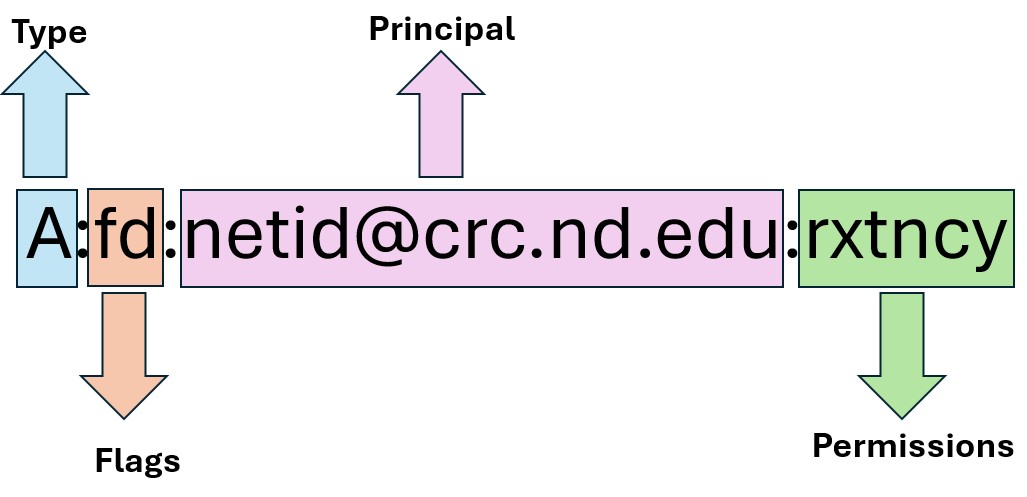
In some cases the flags are completely optional, and in other cases certain flags are required (e.g. when setting permissions for a group).
ACE Type
The ACE type defines the type of access granted to users and groups. By default, any permission that is not explicitly allowed is denied.
Type |
Name |
Description |
A |
Access |
Allow a user or group to perform actions requiring permissions. |
D |
Deny |
Prevent a user or group to perform actions requiring permissions. |
ACE Flags
Each ACE may (but not necessarily) contain flags that define special behavior for the entry.
Flag |
Name |
Description |
g |
Group |
Indicates that the principal represents a group, not a user. |
d |
Directory-inherit |
New subdirectories will inherit the ACE |
f |
File-inherit |
New files will inherit the ACE except for the d/n/i flags |
n |
No-propogate inherit |
New subdirectories will inherit the ACE except the d/n/i flags |
i |
Inherit-only |
New files and subdirectories will have this ACE but without the permission inheritance flags. |
For example, to define an Access Control Entry for a directory that is inherited by new files and subdirectories within this directory, you may want to use the df flags, e.g.:
A:df:netid@crc.nd.edu:rxtncy
ACE Principal
The principal defines the people that the entry is allowing access to. The principal can be a user, group or special principal:
User: netid@crc.nd.edu
Group: ndgroup-1@crc.nd.edu
- Special principals:
OWNER@
GROUP@
EVERYONE@
Warning
When the principal is a group, the g flag for the entry needs to be used, e.g.: A:g:ndgroup-1@crc.nd.edu:rxtncy
ACE Permissions
NFSv4 ACLs provides many different permission types to define permissions for files and directories. These permission types can be used in any combination.
In this documentation we are only focusing on the Read, Write and Execute permissions. The R, W and X aliases can be used to provide read, write and execute permissions, respectively. These are also a combination of the different permission types.
Alias |
Name |
Expansion |
R |
Read |
rntcy |
W |
Write |
watTNcCy (with D added to directory ACE’s) |
X |
Execute |
xtcy |
Note
Without execute (X) permission on a directory, users cannot traverse it, even if they have read (R) permission.
Checking the ACLs
The ACLs can be checked using the nfs4_getfacl.
$ nfs4_getfacl /groups/ndgroup/
# file: /groups/ndgroup/
A:fdg:ndgroup-1@crc.nd.edu:rwaDxtTnNcCy
A:fdg:ndgroup-2@crc.nd.edu:rxtncy
A:fdg:crcsupport@crc.nd.edu:rxtncy
In this example ndgroup-1 has Read, Write and eXecute, and the ndgroup-2 and crcsupport has Read and eXecute permissions.
Warning
Please note that only the owner of the file/directory and system administrators can add, remove and change the ACLs of a file or directory.
Setting ACLs on files and directories
The NFSv4 ACLs can be set for directories or files by using the nfs4_setfacl command.
Use Cases
Giving an individual user full read/write access to an existing folder
Replace nduser with the netid of the user you want to grant access to:
# Give nduser read and execute permissions to the folder /groups/ndgroup/shared:
nfs4_setfacl -a A::nduser@crc.nd.edu:RX /groups/ndgroup/shared

# Give nduser read, write, write and execute permissions to the folder /groups/ndgroup/shared:
nfs4_setfacl -a A::nduser@crc.nd.edu:RWX /groups/ndgroup/shared
Giving a group full read/write access to an existing folder
Replace ndgroup-1 with the group name:
# Give ndgroup-1 read and execute permissions to the folder /groups/ndgroup/shared:
nfs4_setfacl -a A:g:ndgroup-1@crc.nd.edu:RX /groups/ndgroup/shared

# Give ndgroup-1 read, write, write and execute permissions to the folder /groups/ndgroup/shared:
nfs4_setfacl -a A:g:ndgroup-1@crc.nd.edu:RWX /groups/ndgroup/shared
Giving full read/write access recursively to an existing folder
The -R option recursively updates permissions for the specified directory and all of its contents, including subdirectories and files.
# Give nduser read and execute permissions recursively to the folder /groups/ndgroup/shared:
nfs4_setfacl -R -a A::nduser@crc.nd.edu:RX /groups/ndgroup/shared

# Give nduser read, write, write and execute permissions recursively to the folder /groups/ndgroup/shared:
nfs4_setfacl -R -a A::nduser@crc.nd.edu:RWX /groups/ndgroup/shared

# Give ndgroup-1 read and execute permissions recursively to the folder /groups/ndgroup/shared:
nfs4_setfacl -R -a A:g:ndgroup-1@crc.nd.edu:RX /groups/ndgroup/shared

# Give ndgroup-1 read, write, write and execute permissions recursively to the folder /groups/ndgroup/shared:
nfs4_setfacl -R -a A:g:ndgroup-1@crc.nd.edu:RWX /groups/ndgroup/shared
Giving full, inheritable read/write access to an existing folder
If you want newly created files and directories under /groups/PI_netid/shared to automatically inherit the ACL, add the inheritance flags:
# Give nduser inheritable read and execute permissions recursively to the folder /groups/ndgroup/shared:
nfs4_setfacl -R -a A:fd:nduser@crc.nd.edu:RX /groups/ndgroup/shared

# Give nduser inheritable read, write, write and execute permissions recursively to the folder /groups/ndgroup/shared:
nfs4_setfacl -R -a A:fd:nduser@crc.nd.edu:RWX /groups/ndgroup/shared

# Give ndgroup-1 inheritable read and execute permissions recursively to the folder /groups/ndgroup/shared:
nfs4_setfacl -R -a A:fdg:ndgroup-1@crc.nd.edu:RX /groups/ndgroup/shared

# Give ndgroup-1 inheritable read, write, write and execute permissions recursively to the folder /groups/ndgroup/shared:
nfs4_setfacl -R -a A:fdg:ndgroup-1@crc.nd.edu:RWX /groups/ndgroup/shared
Removing full, inheritable read/write access to an existing folder
To revoke access granted through an NFSv4 ACL, use the nfs4_setfacl command with the -x option. The ACL entry specified with -x must exactly match the existing entry you want to remove.
# Revoke nduser's inheritable read and execute permissions recursively to the folder /groups/ndgroup/shared:
nfs4_setfacl -R -x A:fd:nduser@crc.nd.edu:RX /groups/ndgroup/shared

# Revoke nduser's inheritable read, write, write and execute permissions recursively to the folder /groups/ndgroup/shared:
nfs4_setfacl -R -x A:fd:nduser@crc.nd.edu:RWX /groups/ndgroup/shared

# Revoke ndgroup-1's inheritable read and execute permissions recursively to the folder /groups/ndgroup/shared:
nfs4_setfacl -R -x A:fdg:ndgroup-1@crc.nd.edu:RX /groups/ndgroup/shared

# Revoke ndgroup-1's inheritable read, write, write and execute permissions recursively to the folder /groups/ndgroup/shared:
nfs4_setfacl -R -x A:fdg:ndgroup-1@crc.nd.edu:RWX /groups/ndgroup/shared
Additional Options
The nfs4_setfacl command provides other useful options to change the ACLs:
Option |
Function |
-i index |
use the entry-at-index from ACL (only for add and remove) |
-e directory/file |
edit ACL in $EDITOR (DEFAULT: vi) |
-A directory/file |
read ACL entries to add from file |
-X directory/file |
read ACL entries to remove from file |
-s acl_spec |
set ACL to acl_spec (replaces existing ACL) |
-S directory/file |
read ACL entries to set from file |
-m from_ace to_ace |
modify in-place: replace ‘from_ace’ with ‘to_ace’ |